Android
- Minimum OS: Android 6.0 (Marshmallow) or later
- Browser: Chrome 90+ recommended
- Installation: PWA via Add to Home Screen in Chrome
App at Drakaris in Australia: 7,000+ Games on Mobile
The full Drakaris experience on any smartphone or tablet: 7,000+ pokies, live tables from Evolution Gaming, AUD cashier and 24/7 support, all from your mobile browser with no download required.
Everything on Your Phone
The full Drakaris experience on any smartphone or tablet: 7,000+ pokies, live tables from Evolution Gaming, AUD cashier and 24/7 support, all from your mobile browser with no download required.
Play in Browser Must be 18+ to play. Wagering can become habit-forming. Bonus offers are subject to their own terms.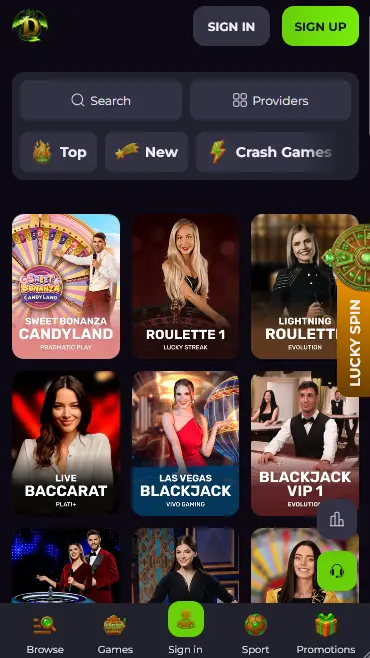
Add Drakaris to Your Home Screen
Mobile at Drakaris – What to Expect
Pros
Cons
Mobile Compatibility
Android
iOS
What the Mobile Version Delivers
Full Feature Parity with Desktop
The cashier, bonus activation, live casino, sportsbook, account settings and live chat all function identically to the desktop site. Nothing is stripped out for mobile.
Instant Load, No Installation
Drakaris runs entirely in the browser, so there is no APK file to download, no app store approval to wait for, and no storage space used on your device.
SSL Encryption on Every Page
All mobile sessions use the same SSL-encrypted connection as desktop. The SOFTSWISS platform applies standard-grade data protection to login, cashier and account management on every device.
Mobile Account Safety
What You Should Do
What You Should Avoid
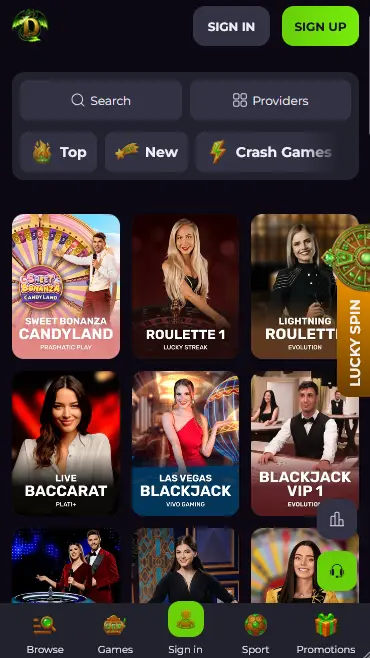
The Drakaris mobile platform is a fully responsive browser build that covers every section of the casino and sportsbook. Pokies from Pragmatic Play, BGaming, Hacksaw Gaming and Nolimit City load with the same speed as desktop. The live casino floor powered by Evolution Gaming streams in real time with touch-optimised controls for bet placement, chip stacking and table switching. The sportsbook covering 40+ sports and 1,000+ live and pre-match events operates with the same market depth as the desktop version. Account management, bonus activation, the cashier and live chat are all accessible from the mobile navigation without switching views.
The mobile lobby includes the same category filters as desktop: Top Games, New, Pokies, Arcane Games, Megaways, Crash Games, Table Games, Live Casino and Jackpots. The provider filter works on touch, making it straightforward to browse titles from a specific studio. The search bar finds game titles by name instantly, which is useful when the catalogue tops 7,000 titles across 100+ providers.
Tournaments, the VIP loyalty programme dashboard, responsible gambling limit settings and the promotions page all render correctly on mobile screen sizes. Withdrawals, including crypto payouts and AUD bank transfer requests, can be initiated and tracked entirely from the mobile cashier without a desktop session.
There are no functional differences between the desktop and mobile browser experiences. The layout adapts to the narrower viewport and touch input, but no features are removed or hidden. One practical difference is that home screen shortcuts on some Android devices may not retain your logged-in session after a full device restart, requiring a re-login. This is a browser security behaviour rather than a Drakaris limitation.
The pokies catalogue on mobile runs every reel mechanic in the library: three-reel classics, video pokies with Megaways engines, Hold and Win titles, cluster-pays formats and bonus-buy options. Gates of Olympus (Pragmatic Play), Wanted Dead or a Wild (Hacksaw Gaming) and Elvis Frog in Vegas (BGaming) are among the most-played titles and are fully touch-optimised. Note that NetEnt and Microgaming titles are not available to Australian accounts, but the catalogues from BGaming, Pragmatic Play, Hacksaw Gaming and Nolimit City are accessible in full.
Evolution Gaming live tables stream reliably over a stable 4G connection. Lightning Roulette, Speed Blackjack, Dragon Tiger, Crazy Time and Dream Catcher are all available in the mobile live lobby. The touch interface handles chip placement and bet confirmation without requiring precise tapping, and the stream quality adjusts automatically to available bandwidth. Pragmatic Play Live, Ezugi, LuckyStreak and Vivo Gaming also supply tables to the mobile live floor.
RNG versions of blackjack, roulette, baccarat, Casino Hold’em and video poker all load on mobile without issues. These are useful during commutes or other situations where a live stream is impractical, as they do not require a sustained data connection to maintain quality.
Progressive jackpot pokies are accessible on mobile, including Pragmatic Play Drops and Wins titles with a global prize pool exceeding $25 million. Jackpot wins are paid in full regardless of the monthly withdrawal cap, and payout requests for large amounts can be submitted directly from the mobile cashier.
Drakaris runs as a progressive web application (PWA) in the mobile browser, requiring no download from an app store. The minimum device requirements are modest, making the platform accessible on mid-range smartphones from 2019 onward.
The Add to Home Screen shortcut on both platforms creates a launcher that opens the site without the browser’s address bar or tabs visible, replicating the visual experience of a native app. The session, preferences and AUD balance all carry across whether you access Drakaris through the shortcut or directly through the browser.
The mobile cashier accepts every payment method available on desktop. For Australian players this includes Visa, Mastercard, Neosurf vouchers, MiFinity, Apple Pay, Google Pay, PayID via PayAnyBank, bank transfer and the full range of cryptocurrency options via CoinsPaid (Bitcoin, Ethereum, USDT, Litecoin, Dogecoin, Tron, Ripple, Cardano, Solana, Bitcoin Cash, Binance Coin). Skrill and Neteller are available but do not qualify for welcome bonus activation.
| Method | Deposit Speed | Withdrawal Speed |
|---|---|---|
| Visa / Mastercard | Instant | 1-3 business days |
| Neosurf | Instant | Deposit only |
| Apple Pay / Google Pay | Instant | N/A |
| MiFinity | Instant | Within 24 hours |
| Crypto (BTC, ETH, USDT) | Instant | Within 24 hours |
| PayAnyBank / bank transfer | Instant | 3-5 business days |
Withdrawal requests are processed by the casino within 72 hours of submission. Completing KYC verification before your first withdrawal request removes the most common cause of payout delays. Bank transfer withdrawals may incur intermediary fees up to $26 AUD that Drakaris does not cover.
All mobile cashier transactions are SSL-encrypted. The SOFTSWISS platform processes financial data through secured payment integrations, and card details are never stored on the casino’s servers. Two-factor authentication, configurable in your account profile, provides an additional protection layer for mobile users whose devices may be shared or used outside the home.
Drakaris does not require a download in the traditional sense. There is no APK file for Android and no .ipa file for iOS. The installation process creates a browser shortcut rather than installing software.
Open Chrome on your Android phone or tablet and navigate to drakarisonline.com. Wait for the homepage to load. Tap the three-dot menu icon in the upper right corner of Chrome. Select Add to Home Screen from the menu that appears. Confirm the shortcut name if prompted and tap Add. The Drakaris icon appears on your home screen or in your app drawer. Tap it to launch the site directly.
Open Safari on your iPhone or iPad and go to drakarisonline.com. Once the page loads, tap the Share button at the centre of the bottom toolbar (a square with an upward-pointing arrow). In the share sheet that slides up, scroll down and tap Add to Home Screen. Edit the name if desired, then tap Add in the top right corner. The shortcut appears on your home screen. Tap it to open Drakaris without going through Safari’s address bar.
For both platforms the resulting shortcut behaves as a PWA: it opens without browser chrome visible, loads Drakaris directly, and preserves your account session across uses. Updates are automatic because the platform lives on the server, not the device. If your browser prompts you with an Add to Home Screen banner while browsing the site, tapping it completes the same process in one step.
New Australian players can register entirely from the mobile site. Tap the Register button on the Drakaris homepage, complete the short form with your email address, password and date of birth, and select AUD as your account currency. Email confirmation is sent immediately. Once the link in that email is clicked, the account is active and the welcome package is available. Registration takes under two minutes on a mobile connection.
Use your registered email and password on the login screen. If two-factor authentication is enabled, a verification step follows the password entry. The session remains active on trusted devices, so returning players typically go directly to the lobby without re-entering credentials. If you are using Drakaris from a new device or have cleared your browser data, a fresh login is required. Full sign-in troubleshooting is covered on the login page.
The full welcome package is claimable on mobile. Deposit via the mobile cashier, enter the promo code for the relevant stage (FIRST, SECOND or THIRD) before confirming the transaction, and the bonus credits immediately. Free spins are released in daily batches after each qualifying deposit. Wagering on an active bonus must respect the $8 AUD maximum bet per spin, which applies equally on mobile. Full welcome terms and wagering rules are on the bonus page. 18+ only.
Live chat is available 24/7 from within the mobile site and connects to a human agent typically within two minutes. The chat icon is accessible from the navigation on every page. Email at [email protected] handles account issues, KYC document submissions and escalated disputes. There is no phone support line.
Responsible gambling tools are accessible from your account dashboard on mobile: deposit limits, loss limits, wager limits, session time reminders, cooling-off periods and self-exclusion. Limit reductions take effect immediately. Increases require email confirmation and a 24-hour delay before activation. Australian players seeking additional support can contact Gambling Help Online on 1800 858 858, which provides free and confidential assistance.
Mobile Questions
Drakaris does not currently list a native app on Google Play or the Apple App Store. The full platform runs as a mobile-optimised site and can be installed as a PWA shortcut from your browser using the Add to Home Screen option.
Yes. The mobile cashier supports the same deposit methods as the desktop site, including Neosurf vouchers. Enter the 10-digit voucher code in the cashier section of your mobile browser exactly as you would on desktop.
Yes. Because the platform runs in the browser rather than as a downloaded app, all updates happen server-side. You always have the current version the next time you open the site or the home screen shortcut, with no manual update required.
Play Drakaris on Mobile
Grab 450% up to A$4,500 and 450 free spins.
Enter Casino Must be 18+ to play. Wagering can become habit-forming. Bonus offers are subject to their own terms.